
There’s a special kind of frustration that comes with a failed video download. You were seconds away from watching that crucial tutorial, important presentation, or movie for your flight, and now you are stuck with a useless looking .csdownload file.
But in most cases, you have not lost everything.
As a video producer who has dealt with countless corrupted and incomplete files, I can confirm that the data you already downloaded is often perfectly watchable. You just need the right tool to unlock it. That tool is VLC Media Player.
This guide shows you exactly how to salvage and play a partially downloaded video so your time was not wasted.
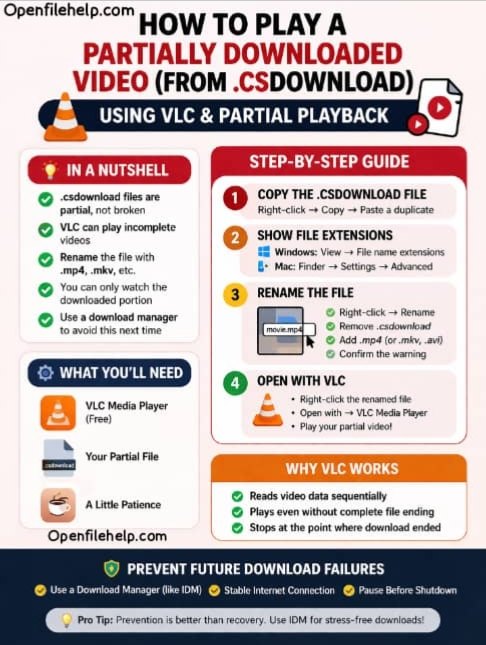
In a Nutshell: Salvaging Your Video
Before jumping into the steps, here is the quick reality check:
- It is a partial file, not a broken one
The.csdownloadfile contains real video data. It is incomplete, but not necessarily corrupted. - VLC is your best friend
VLC Media Player is highly tolerant of incomplete video files and can play them up to the point the download stopped. - Renaming is required
You must remove.csdownloadand replace it with a video extension such as.mp4. - This is salvage, not repair
You are recovering the downloaded portion only. The video will stop where the download failed. - Prevention matters
Using a proper download manager is the best way to avoid partial files in the future.
Your Step by Step Guide to Playing a Partial Video
Follow these steps carefully to recover your video.
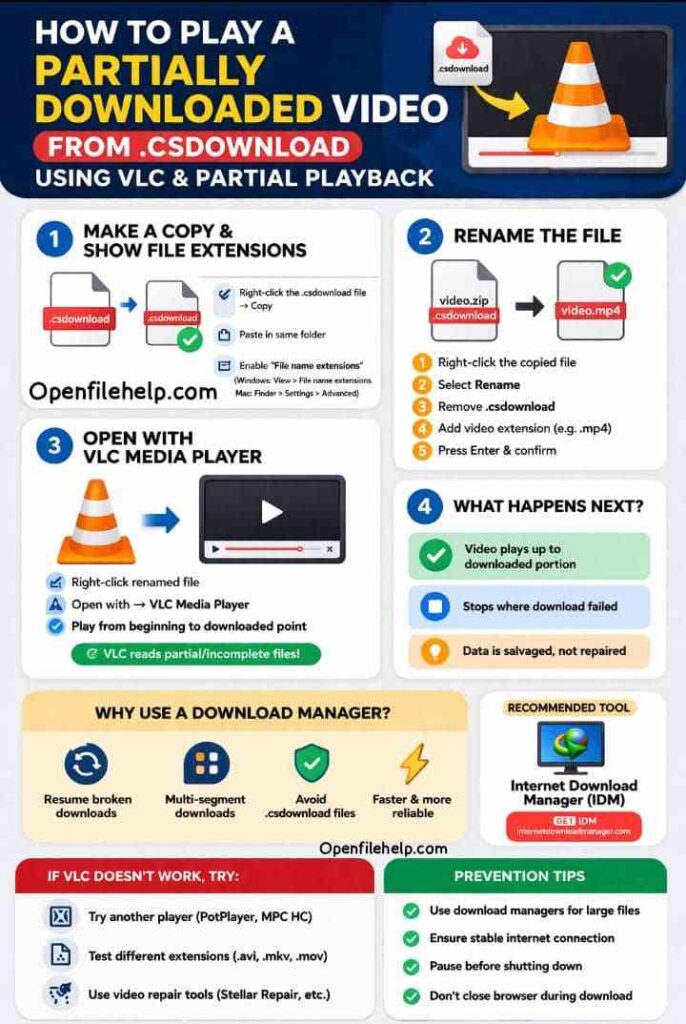
Step 1: Make a Copy and Reveal the File Extension
Always work on a copy so the original file remains untouched.
- Locate your
.csdownloadfile
Example:my_movie.zip.csdownload - Right click and select Copy
- Paste it in the same folder
You should now see something likemy_movie.zip - Copy.csdownload
Next, make sure file extensions are visible.
On Windows
- Open any folder
- Go to View
- Enable File name extensions
On Mac
- Open Finder
- Go to Settings
- Select Advanced
- Enable Show all filename extensions
Step 2: Rename the File
This step tells your system to treat the file as a video.
- Right click the copied
.csdownloadfile - Select Rename
- Remove
.csdownloadcompletely - Replace it with a video extension, usually
.mp4
Example:
Frommy_movie.zip - Copy.csdownload
Tomy_movie - Copy.mp4
- Press Enter
- Confirm the warning message
Step 3: Open the File with VLC Media Player
Do not double click the file.
- Right click the renamed file
- Select Open with
- Choose VLC Media Player
If successful, VLC will play the video from the beginning and stop exactly where the download ended.
Why VLC works:
VLC reads video data sequentially and does not require a proper ending file structure. This makes it ideal for partial playback.
Learn how to resume or repair interrupted Chrome downloads using .crdownload files with 5 practical methods that help recover files safely.
Stop Worrying About Failed Downloads
Salvaging a partial file is useful, but it is still a workaround.
If you regularly download large video files, prevention is the smarter solution.
Internet Download Manager (IDM) downloads files in multiple segments and can resume from the exact point of interruption. No partial files, no renaming tricks, just completed downloads.
👉 Get Internet Download Manager
https://www.internetdownloadmanager.com/
What to Do If VLC Does Not Work
If VLC fails, try the following:
- Try another media player
PotPlayer or MPC HC may succeed where VLC fails - Try another extension
If.mp4fails, test.avi,.mkv, or.mov - Use a video repair tool
Paid tools like Stellar Repair for Video can sometimes reconstruct more of the file
The Best Fix: Prevention
The most reliable fix is avoiding partial downloads entirely.
- Use a download manager for large files
- Ensure a stable internet connection
- Pause downloads before shutting down your computer
- Avoid closing the browser mid download
Concluding Thought
A .csdownload file does not mean your video is lost forever. With VLC Media Player and a simple rename, you can often recover most of the video and still get what you need. It is a simple trick, but an extremely powerful one.
Accidentally deleted JPG photos or thumbnails? Stop now, check Recycle Bin/Trash, then use recovery software like Disk Drill to scan, preview & restore your images fast
Frequently Asked Questions (FAQs)
It works best with streamable formats like MP4, AVI, MKV, and MOV. Proprietary formats may not play without a complete file.
Start with .mp4. If that fails, try .avi, .mkv, or .mov.
Either the download failed too early, or the format requires a complete file. In that case, the only option is to re download.
Yes. The worst outcome is an error message. There is no risk to your system from trying this method.
It works on Windows, Mac, and Linux. VLC is available on all major platforms.