
How to Open NAR Files: The Simple Guide to Nokia, Nexon, NiFi, and More
Opening a .nar file gets confusing fast because the extension does not point to just one format.
In practice, it can refer to different file types used by different apps and platforms, including Nexon game archives, Nokia Lumia Smart Cam photo archives, Apache NiFi bundles, Ukagaka Ghost packages, and even Nikon related raw images in some file databases.
That is why the best approach is not to guess. It is to identify the source first, then open the file with the right tool.
In a Nutshell
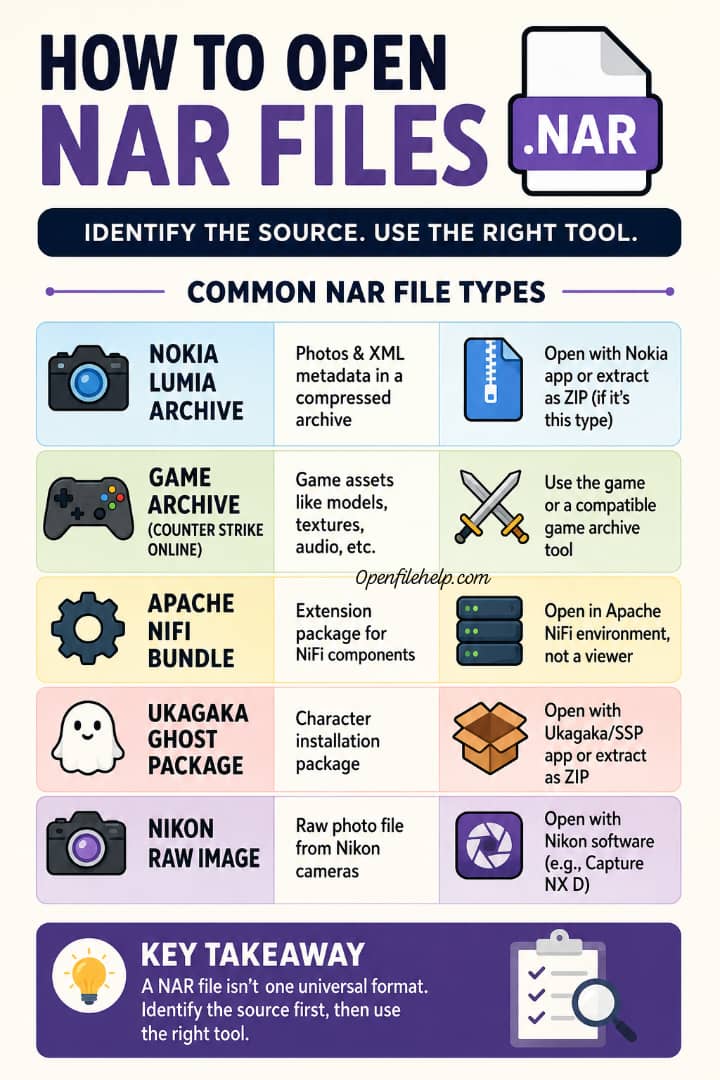
A NAR file is not one universal format. It may be a game archive, a photo archive, a desktop character package, or a software bundle, depending on where it came from.
The fastest way to avoid frustration is to check the file’s origin before doing anything else. A NAR from a Nokia phone, for example, behaves very differently from a NAR used by Apache NiFi or Counter Strike Online.
For Nokia style NAR files, support answers and file format guides say the contents may be a zipped container with JPG images and XML metadata, and some users extract the contents by renaming the file to .zip. That trick does not apply to every NAR file, so use it only when the file is clearly a photo archive.
What a NAR file actually is
Here is the simple truth. A NAR file is an extension that has been reused by multiple software ecosystems. FILExt identifies one common use as a game data archive tied to Counter Strike Online, while File.org describes Nokia Archive as a compressed photo archive used on Lumia devices.
FILExt also notes that some NAR files are Nikon raw images, and Apache documents NAR files as bundle artifacts used in NiFi.
That means the file extension alone is not enough. Two files with the same .nar ending can need completely different opening methods. That is the part many people miss, and it is the reason they keep trying the wrong app first.
A quick table to help you identify the right kind of NAR file
| Likely NAR type | What it usually contains | Best first move |
|---|---|---|
| Nokia Archive or Lumia Smart Cam file | Photos and XML metadata in a compressed archive | Try the original Nokia or Lumia related app first, then inspect the file as a ZIP archive only if it is clearly that type of file. |
| Counter Strike Online game archive | Game assets such as audio, models, textures, or graphics | Open it with the game or a compatible game archive tool. FILExt lists Counter Strike Online as the primary association. |
| Apache NiFi NAR bundle | Extension package for NiFi components and plugins | Use Apache NiFi development or deployment tools, not a photo viewer. Apache’s docs treat NAR as a bundle artifact in NiFi. |
| Ukagaka Ghost package | Character installation package for Ukagaka software | Open it in the intended Ukagaka or SSP type application. File.org and Fileinfo both describe this use. |
| Nikon related raw image | Raw photo file recognized by Nikon software | Open it with Nikon Capture NX D or matching Nikon software. FILExt lists this use. |
READ ALSO: How to Open a ZIP File on Windows 11 or 10 Without Extra Software (Step by Step 2026 Guide).
How to open a NAR file the right way
Method 1: Start with the file source
This is the method I recommend first, because it saves the most time. Ask yourself a simple question: where did this file come from?
If it came from a Lumia phone, Microsoft support threads and file format guides describe it as a Nokia Smart Cam style image archive with JPG files and XML metadata inside.
If it came from a game folder, FILExt identifies Counter Strike Online as the main association. If it came from a NiFi build, Apache’s documentation shows that NAR files are bundles used by the platform.
That matters because the same extension can lead you in the wrong direction if you open it with a generic archive app before identifying the source.
From my own experience, that is where most people waste the first 20 minutes. The fix is usually not difficult. The fix is choosing the right category from the start.
Method 2: If it is a Nokia or Lumia NAR file, treat it like a photo archive
Nokia Archive files are described as compressed archives that hold images and XML metadata. File.org says these files are usually found on Lumia devices, and Microsoft Q&A answers note that users can often rename them to .zip and extract the JPGs with unzip tools.
That makes this kind of NAR one of the easiest to inspect, as long as you already know it is the photo archive variant.
Here is the practical version. First, copy the file so you keep the original safe. Then rename the copy from .nar to .zip. After that, try opening it with a normal archive tool.
If the file contains images and XML, you are likely looking at a Lumia style archive. If the file does not behave like a ZIP archive, stop there and do not force the rename trick onto other NAR types.
READ ALSO: How to Open DLL Files Safely: 4 Practical Ways to View, Inspect, and Troubleshoot Them
Method 3: If it came from a game, use the game or a game archive tool
FILExt says the NAR extension is primarily associated with Counter Strike Online and describes those files as video game asset archives.
In that case, the file may contain models, textures, audio clips, or graphics used by the game. That means the best opener is usually the game itself or a specialized tool made for that archive format.
This is where a lot of people make a small but costly mistake. They treat a game archive like a normal document or photo file and then wonder why nothing opens.
Game archives are often meant for the software that created them, not for general browsing. If your file came from a game installation, a mod folder, or a game cache, that is a strong clue you should stay in the game ecosystem first.
Method 4: If it belongs to Apache NiFi, open it as a NiFi bundle
Apache’s official documentation shows NAR files used in NiFi Registry and notes that a NAR uploaded to the registry must contain an extension manifest created by the NAR Maven plugin.
Apache also explains that some NiFi binary builds do not include every NAR file from the full release. In other words, NiFi NAR files are package artifacts for the platform, not ordinary media files.
So, if your NAR file comes from a NiFi project, the right move is to work within the NiFi build or deployment environment.
You are not trying to “open” it the way you would open a photo. You are handling a component bundle that helps NiFi run or extend its dataflow capabilities.
Unlock Any APK: How to Extract Resources, Icons & Code in 60 Seco
Method 5: If it is a Ukagaka Ghost package, use the matching desktop character app
File.org lists Ukagaka Ghost as another known use of the NAR extension, and Fileinfo describes NAR files in that context as ZIP compressed archives used to install a character or mascot in Ukagaka software.
Fileinfo also notes that you can decompress them like a ZIP archive if you only want to view the contents.
That is a very different workflow from gaming or photography. The important point is the same, though. Match the file to the software ecosystem it came from, and the file becomes much easier to handle.
Method 6: If it is a Nikon related NAR file, use Nikon software
FILExt says NAR is also used as the extension for a raw image captured by Nikon cameras, and that Capture NX D can import and process such images. So if your file came from Nikon gear or Nikon software, that is the route to try first.
What to do if you still cannot open it
First, do not keep renaming the file blindly. File.org specifically warns that different programs may use the same extension for different purposes, so you may need to try more than one program only after confirming the file’s origin. That warning is worth taking seriously.
Second, inspect the filename and the folder it came from. A file that appears beside photos from a Lumia phone is probably not the same thing as a NAR bundled with a NiFi project or a game install. Even a small clue like the parent folder or the app that created it can save you a lot of guesswork.
Third, make a copy before testing anything. That way, if the file turns out to be a special archive rather than a simple ZIP based container, you still have the original untouched. That is just good file handling practice, especially when the extension is ambiguous.
Practical examples
If the file came from a Lumia phone and the name looks like a camera output file, you are probably dealing with a Nokia style photo archive.
In that case, the file may contain multiple JPG images plus XML metadata, and extraction may be possible with a ZIP tool after a safe copy and rename.
If the file came from Counter Strike Online or another Nexon based game setup, you are more likely dealing with a game asset archive.
That means the content may be textures, audio, models, or graphics, and a game specific tool is the better path.
If the file came from an Apache NiFi project, think of it as a bundle or extension package. The right context is the NiFi environment, not a media player or generic file viewer. Apache’s official docs make that very clear through their registry and build process.
Safety and best practices
Keep the original file intact. Work on a copy. That single habit solves a lot of accidental damage.
Use the app that created the file whenever possible. That is the safest opener for proprietary formats, especially when the extension is shared by several unrelated software systems.
Do not assume every NAR is a ZIP file. Some are compressed archives, some are software bundles, and some are game assets. The extension may look familiar, but the structure underneath may not be.
Troubleshooting checklist
If nothing opens, ask where the file came from. That is the best diagnostic question.
If the file came from a phone camera, try archive inspection only after making a copy and confirming it is the Lumia style variant.
If the file came from NiFi, look for the NiFi project or plugin context. Apache’s docs show that NAR is part of NiFi’s bundle system.
If the file came from a game, search for the game’s own tools or compatible archive utilities. FILExt’s main listing places Counter Strike Online at the center of the game related NAR use case.
Final takeaway
The smartest way to open a NAR file is not by searching for a single universal opener. It is by identifying the source first and then using the matching app or extractor.
Once you know whether the file came from a Nokia phone, a Nexon game, a NiFi build, a Nikon workflow, or a Ukagaka package, the rest becomes much simpler.
That is the real secret here, and in my view, it is the difference between guessing and actually solving the problem.
Frequently Asked Questions
No. Some NAR files are ZIP style archives, especially the Lumia and Ukagaka related ones, but others are game archives or NiFi bundles. The extension alone does not tell the whole story.
Only for the archive based variants, such as some Nokia Lumia files. Microsoft Q&A answers mention that approach for extracting JPGs from Nokia style NAR files, but it is not a universal fix.
File.org says Nokia Lumia Smart Cam software is the best match for Nokia Archive files. If you only need the contents, an archive tool may help after identifying the file as that type.
FILExt identifies Counter Strike Online as the primary association and describes the file as a game data archive. In that case, the game or a dedicated extractor is the right place to start.
Because different software developers reused the same extension for different purposes over time. File.org and FILExt both show that .nar appears in multiple ecosystems, including Nokia, Ukagaka, Nexon, Nikon, and Apache NiFi.